Say “Hey Claude”.
Then just talk.
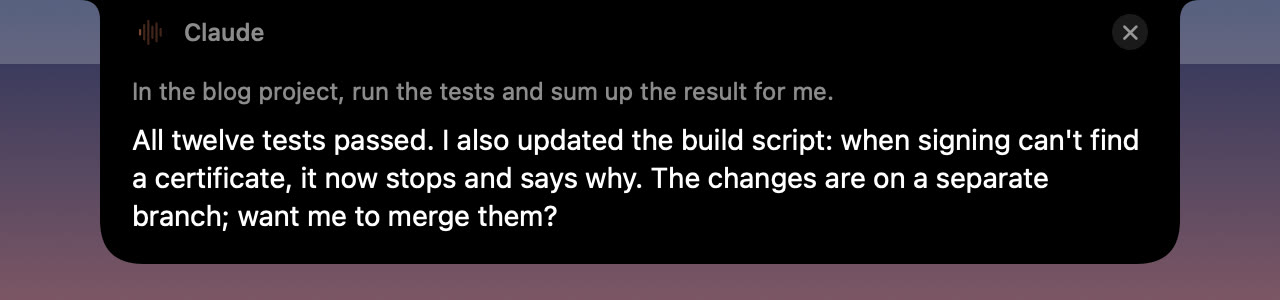
HeyClaude lives in your Mac’s notch. Say the wake phrase and what you want; when you stop talking, it goes to Claude Code as the prompt. The answer shows up in the notch and is read back to you, and you can reply the same way.
7 days free, everything included · One-time purchase · macOS 26 or later · Needs Claude Code
Or with Homebrew: brew install --cask cobanov/tap/heyclaude
A Claude Code session you don’t have to type
No window to find, no terminal to switch to. Keep your hands on what you were doing.
Say “Hey Claude”
The notch opens and listens. Go on in the same breath; nothing is cut off.
Talk, then pause
Your words appear as you speak. A short pause sends them to Claude Code.
Claude gets to work
A real Claude Code session in your projects folder, with your settings and CLAUDE.md files.
Hear the answer
Claude replies in a few spoken sentences, in your language. The full text stays in the notch.
Keep the conversation
Answer Claude out loud and the same session carries on. Stay quiet or say “that’s all” to end it.
Pick it up later
Sessions are saved like any other. Open one in a terminal with
claude --resume.
You decide what Claude may do
A voice session can’t show a permission prompt, so you choose up front: follow your own Claude Code rules, also let it edit files, or let it work on its own.
- Pick the folder sessions start in and the model
- Turkish or English prompts, a voice for each
- Pause listening from the menu bar whenever you like
- No notch? HeyClaude draws one in the menu bar

- On your MacSpeech is recognised on the device. Only the finished prompt goes to Claude, through Claude Code.
- Your ClaudeUses your own Claude Code sign-in and plan. No extra account.
- LightA small native app. It sits in the notch until you call it.
- YoursPay once. No subscription.
One price, no subscription
Try everything free for 7 days. Buy when you’ve stopped reaching for the keyboard.
- Use it on up to 3 of your Macs
- All 0.x and 1.x updates included
- Apple silicon and Intel
- Full refund within 14 days
Checkout and taxes handled by Polar. Your license key arrives by email.
Questions
What do I need?
A Mac with macOS 26 or later, and Claude Code installed and signed in, so that claude works in Terminal. HeyClaude uses your own Claude plan.
Is my voice sent anywhere?
No. The wake phrase and your prompts are recognised on your Mac with Apple’s on-device speech models. Only the text of the finished prompt goes to Claude, the same way it would if you typed it into Claude Code.
Which languages can I speak?
Prompts can be in English or Turkish; the wake phrase is always “Hey Claude”. Claude answers in the language you spoke.
Can Claude change files or run commands?
Only what you allow. By default it follows your Claude Code permission settings and anything that would need your approval is declined. In Settings you can also let it edit files, or let it work on its own with Claude Code’s auto mode.
Can I install it with Homebrew?
Yes: brew install --cask cobanov/tap/heyclaude. brew upgrade then keeps it up to date, and brew uninstall --zap heyclaude removes its settings too.
What happens after the trial?
HeyClaude stops listening and asks for a license key. Your settings stay as they are, so it works again as soon as you enter the key.
I bought a new Mac. Can I move my license?
Yes. Each key works on 3 Macs at a time. To free a Mac, open Settings › License › Deactivate on This Mac, or write to support.